
Switching over to another cPanel theme with a different style is easy and there are two ways to do so.
First method: Paper Lantern Theme.
1. Log into your cPanel account.
2. In the "Preferences" section, click on the "Change Style" Icon.

3. You will see a lot of themes on the themes page. Just select the one you like and click on "Apply". 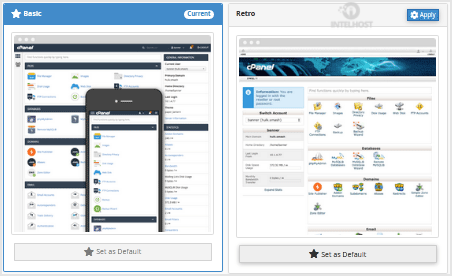
Second method: Change the theme instantly (Retro X3 Theme Only)
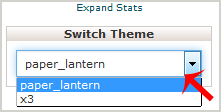
1. We assume you are already logged into your cPanel account. In your cPanel account near the left side of the page you should see a "Switch Theme" option with drop-down menu.
2. Choose your favorite theme from the drop-down menu and it will apply automatically.
Categories
4
Backup Restore
1 Central del Cliente
28 cPanel Video Tutoriales
11 Databases
9 DNS Nameserver
10 Domain Management
20 Email
9 FTP
13 htaccess cPanel
6 Instalación Panel de Control
8 Mail Filters & SPAM
11 Móvil
25 Panel cPanel
24 Plesk Tutorials
3 Programación
1 Reseller Hosting
10 Seguridad
59 SiteWorx (Control Panel)
79 Softaculous
19 SolusVM
5 SSL
2 VPS Hosting
23 WHM Video Tutoriales
18 Wordpress Hosting
Categories
Tag Cloud
- 32 Users Found This Useful
Related Articles
Cómo restablecer la contraseña de mi cuenta de cPanel?
If you can access your cPanel account, follow these steps to reset your password:1. Log into your...
Cómo cambiar el idioma de tu cPanel?
cPanel supports a lot of languages, and if you want to change your cPanel language to your native...
Cómo subir archivos a través del cPanel File Manager?
If you don't want to use a 3rd party FTP Software, you can use the cPanel's inbuilt File...
Cómo crear una nueva carpeta o archivos en cPanel File Manager?
1. Log into your cPanel account.2. In the "Files" section, click on the "File Manger" Icon. 3....
Cómo editar un archivo en cPanel File Manager?
1. Log into your cPanel account.2. In the "Files" section, click on "File Manger" Icon. 3. cPanel...
Powered by WHMCompleteSolution

Loading...
Loading...