
1. Log into your cPanel account.
2. In the "Databases" section, click on "MySQL Databases" Icon.

3. Under "MySQL Users" in the "Username" field enter the new username you wish to create.
4. Enter your new password or use a password generator.
5. Click on the "Create a User" Button.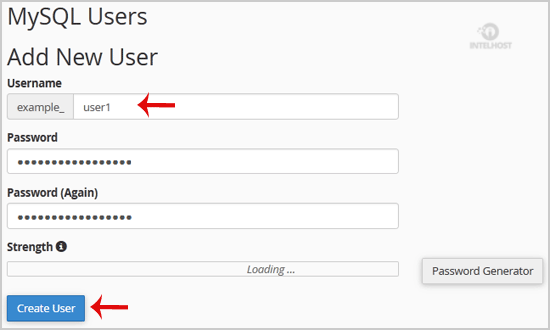
Tip: Write down the Database Username and Password on a notepad so that when you need them, you can easily recall them while installing a script manually.
Categories
4
Backup Restore
1 Central del Cliente
28 cPanel Video Tutoriales
11 Databases
9 DNS Nameserver
10 Domain Management
20 Email
9 FTP
13 htaccess cPanel
6 Instalación Panel de Control
8 Mail Filters & SPAM
11 Móvil
25 Panel cPanel
24 Plesk Tutorials
3 Programación
1 Reseller Hosting
10 Seguridad
59 SiteWorx (Control Panel)
79 Softaculous
19 SolusVM
5 SSL
2 VPS Hosting
23 WHM Video Tutoriales
18 Wordpress Hosting
Categories
Tag Cloud
- 24 Users Found This Useful
Related Articles
Cómo crear una Base de Datos en cPanel?
1. Log into your cPanel account.2. In the "Databases" section, click on "MySQL Databases" Icon....
Cómo Renombrar una Base de Datos en cPanel?
1. Log into your cPanel account.2. In the "Databases" section, click on "MySQL Databases" Icon....
Cómo borrar una Base de Datos en cPanel?
1. Log into your cPanel account.2. In the "Databases" section, click on "MySQL Databases" Icon....
Cómo agregar un usuario a una base de datos y agregar privilegios?
1. Log into your cPanel account.2. In the "Databases" section, click on "MySQL Databases" Icon....
Cómo importar la base de datos a través de phpMyAdmin en cPanel?
1. Log into your cPanel account.2. In the "Databases" section, click on "phpMyAdmin" Icon.3. In...
Powered by WHMCompleteSolution

Loading...
Loading...