
1. Log into your cPanel account.
2. In the "Email" section, click on "Email Filters" Icon.

3. Under "Filters by Users" You can see all of your existing email accounts, Click on "Manage Filters" next to the appropriate one. 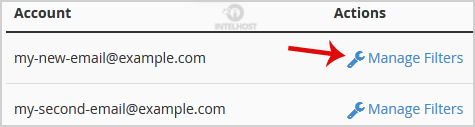
4. Under "Current Filters" You can see all of your existing filters, Click on "Delete" next to the appropriate one. 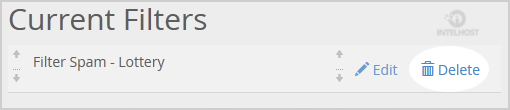
5. Click on the "Delete" button.
6. Now click on the "Delete Filter" button to remove your filter.
Categories
4
Backup Restore
1 Central del Cliente
28 cPanel Video Tutoriales
11 Databases
9 DNS Nameserver
10 Domain Management
20 Email
9 FTP
13 htaccess cPanel
6 Instalación Panel de Control
8 Mail Filters & SPAM
11 Móvil
25 Panel cPanel
24 Plesk Tutorials
3 Programación
1 Reseller Hosting
10 Seguridad
59 SiteWorx (Control Panel)
79 Softaculous
19 SolusVM
5 SSL
2 VPS Hosting
23 WHM Video Tutoriales
18 Wordpress Hosting
Categories
Tag Cloud
- 24 Users Found This Useful
Related Articles
Cómo habilitar Apache SpamAssassin en cPanel?
Apache SpamAssassin is a mail filter that identifies spam. It is an intelligent email filter that...
Cómo editar Filtro de Level/Global de Email en cPanel?
1. Log into your cPanel account. 2. In the "Email" section, click on "Global Email Filters" Icon....
Cómo crear un Filtro de Email Level/Global en cPanel para Combatir el Spam?
It's hard to completely stop spam e-mail but you can filter it, discard it, deliver it to...
Cómo Eliminar Filtro de Email Level/Global en cPanel?
1. Open "Account-Level Filtering" in your cPanel Account. 2. Under "Current Filters" you can see...
Como crear "User Level Email Filter" en cPanel?
It's hard to completely stop spam e-mail but you can filter it, discard it, deliver it to...
Powered by WHMCompleteSolution

Loading...
Loading...