
After purchasing our hosting account, you will receive a Welcome email from us which contains our "name server" and you need to update your domain name server to our "name server".
If your domain is registered on 123-reg, you should follow this tutorial to update the NameServer of your Domain to our NameServer.
1. Open the 123-reg.co.uk website and click on "Control Panel". It will show you a login form.
2. Enter the username and password of your 123-reg account and then click the "login" button.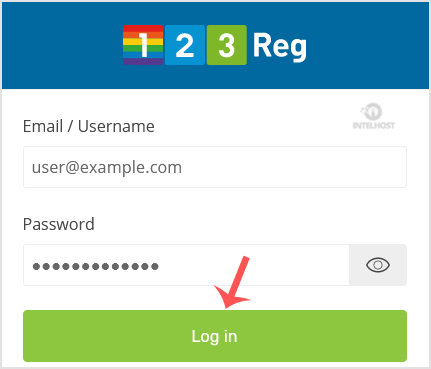
3. After a successful login, select the appropriate domain from the dropdown list and then click on the "Manage" button.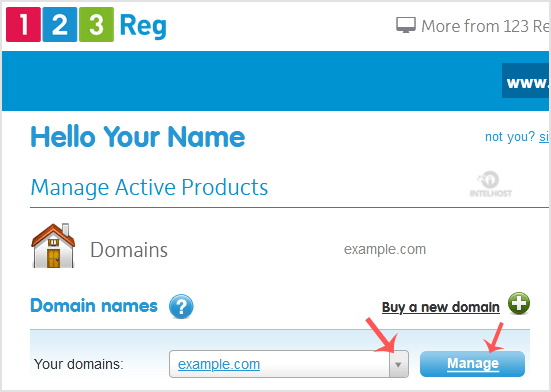
4. Scroll down to the "Advanced domain settings" and then click on "Change Nameservers (DNS)".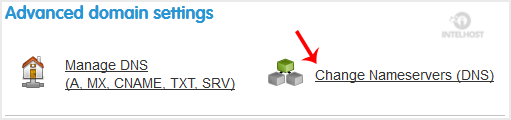
5. Enter your Nameserver in field 1 and field 2 and then click on the "Update" Button.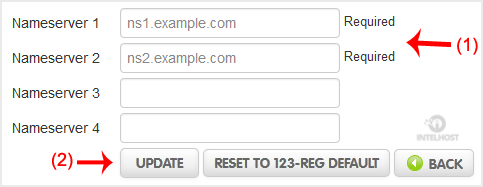
You will see a success message.
Note: It may take anywhere from 12 to 24 hours for the changes to take effect worldwide.
Categories
4
Backup Restore
1 Central del Cliente
28 cPanel Video Tutoriales
11 Databases
9 DNS Nameserver
10 Domain Management
20 Email
9 FTP
13 htaccess cPanel
6 Instalación Panel de Control
8 Mail Filters & SPAM
11 Móvil
25 Panel cPanel
24 Plesk Tutorials
3 Programación
1 Reseller Hosting
10 Seguridad
59 SiteWorx (Control Panel)
79 Softaculous
19 SolusVM
5 SSL
2 VPS Hosting
23 WHM Video Tutoriales
18 Wordpress Hosting
Categories
Tag Cloud
- 0 Users Found This Useful
Related Articles
Cómo puedo registrar solo un nombre de dominio?
Puede registrar un dominio en cualquier momento desde Dominios. No se requiere compra.
Cómo puedo transferirle el registro de mi dominio desde mi registrador actual?
Puede transferir un dominio en cualquier momento yendo a https://www.intelhost.com/dominios.html...
Puedo renovar mi nombre de dominio después de que caduque?
Si está renovando un dominio después de su fecha de vencimiento, debe comunicarse con nuestro...
Cómo actualizar el Servidor de Nombres DNS en Name.com?
Después de comprar nuestra cuenta de alojamiento, recibirá un correo electrónico de bienvenida...
Cómo actualizar el Servidor de Nombres DNS en DynaDot
Después de comprar nuestra cuenta de alojamiento, recibirá un correo electrónico de bienvenida...
Powered by WHMCompleteSolution

Loading...
Loading...