
If you are going on a holiday or will be unavailable for a few days or a month, you can create an auto e-mail responder for your e-mails so that when people email you, they will receive an automated e-mail with your message like "I am on a holiday, please e-mail me in a few days' time".
1. Log into your SiteWorx account. (e.g. www.example.com:2443/siteworx/ )
2. Under "SiteWorx Menu", click the "Hosting Features" menu item if it is not already open.
3. Click the "E-mail" menu item and then click on "Autoresponders" option.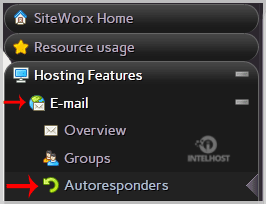
4. In the "E-mail Address" field, enter the email address on which you want to enable autoresponder. If you want to enable auto responder on YourEmail@example.com, enter "YourEmail" (without the quotes).
5. In the "Send copy to" field, enter your personal e-mail address where you want to receive copy of your emails (Optional).
6. In the "Autoresponder Message" field, enter message like "I am on vacation", etc.
7. Click on the "Add" button.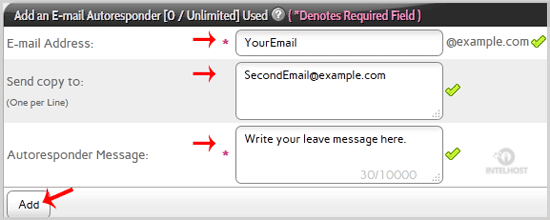
How to remove Autoresponder?
1. Open Autoresponder.
2. You should see your autoresponder email list under "Existing Autoresponders".
3. Click on the "Delete" button next to the e-mail address.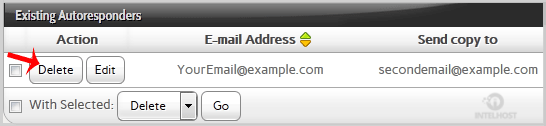
Categories
4
Backup Restore
1 Central del Cliente
28 cPanel Video Tutoriales
11 Databases
9 DNS Nameserver
10 Domain Management
20 Email
9 FTP
13 htaccess cPanel
6 Instalación Panel de Control
8 Mail Filters & SPAM
11 Móvil
25 Panel cPanel
24 Plesk Tutorials
3 Programación
1 Reseller Hosting
10 Seguridad
59 SiteWorx (Control Panel)
79 Softaculous
19 SolusVM
5 SSL
2 VPS Hosting
23 WHM Video Tutoriales
18 Wordpress Hosting
Categories
Tag Cloud
- SiteWorx
- 0 Users Found This Useful
Related Articles
How to Create an E-mail Account with Siteworx?
To create a new e-mail address, perform the following steps:1. Log into your SiteWorx account....
How to Remove Email account in SiteWorx?
To remove a email address, perform the following steps:1. Log into your SiteWorx account (e.g....
How to change your e-mail password at SiteWorx?
To change your e-mail password, perform the following steps:1. Log into your SiteWorx account....
How to Access your Email Account from SiteWorx Webmail?
1. Log into your SiteWorx account. (e.g. www.example.com:2443/siteworx/ )2. Under "SiteWorx...
How to forward email to Gmail, Yahoo or other e-mail service providers?
1. Log into your SiteWorx account. (e.g. www.example.com:2443/siteworx/ )2. Under "SiteWorx...
Powered by WHMCompleteSolution

Loading...
Loading...