
If you send an email via iOS, a signature will be automatically added in reply such as "Sent from my iPhone". But do you know that you can customize this signature as well?
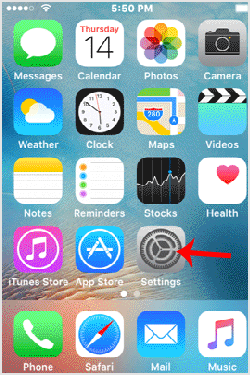
1. Open the main screen of your Apple Mobile and click on the "Settings" Icon.
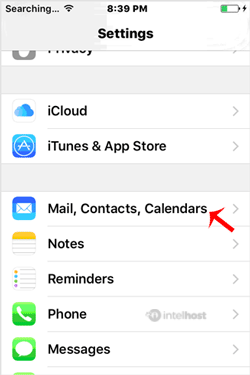
2. Tap on "Mail, Contacts, Calendars".
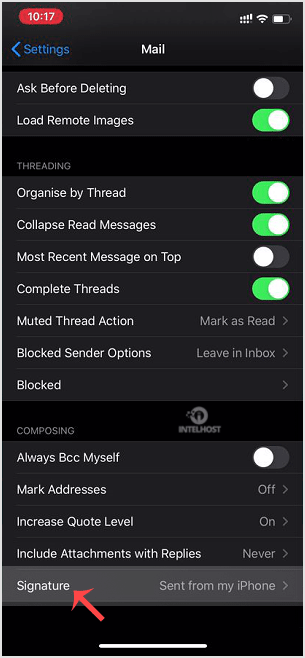
3. Now tap on "Signature".
4. Customize your signature.
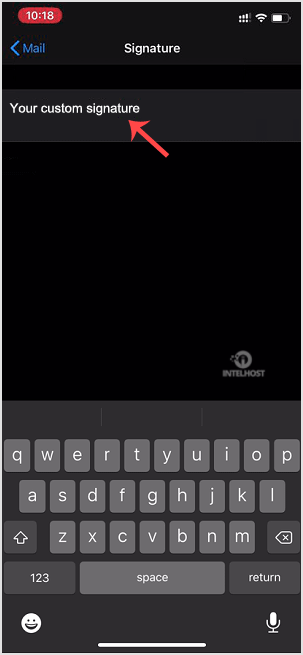
After changing it, your iOS will send your customized signature instead of the default signature.
Categories
4
Backup Restore
1 Central del Cliente
28 cPanel Video Tutoriales
11 Databases
9 DNS Nameserver
10 Domain Management
20 Email
9 FTP
13 htaccess cPanel
6 Instalación Panel de Control
8 Mail Filters & SPAM
11 Móvil
25 Panel cPanel
24 Plesk Tutorials
3 Programación
1 Reseller Hosting
10 Seguridad
59 SiteWorx (Control Panel)
79 Softaculous
19 SolusVM
5 SSL
2 VPS Hosting
23 WHM Video Tutoriales
18 Wordpress Hosting
Categories
Tag Cloud
- 0 Users Found This Useful
Related Articles
Cómo agregar una cuenta de email de cPanel en Apple/iOS?
You can add a cPanel email account to your Apple IOS mobile and be able to automatically check...
Cómo revisar/obtener un email en Apple/iOS?
You can set an automatic email sync frequently but should you want to manually check for new...
Cómo sincronizar o recuperar automáticamente un email de cPanel Apple/iOS?
You can automatically set an automatic email syncing option. This means that if you received any...
Powered by WHMCompleteSolution

Loading...
Loading...