
We hope that you have already read our tutorial onHow to add cPanel email account in Android Mobile and you have already added a the built-in email widget to your android screen.
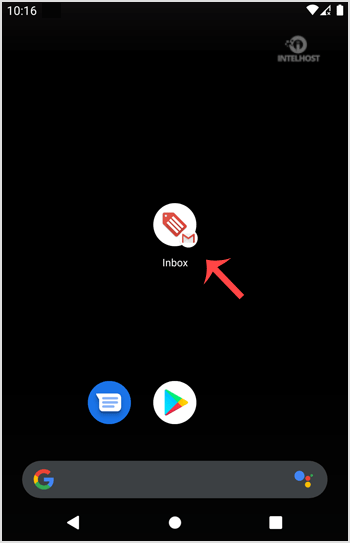
1. Press on the email inbox icon.
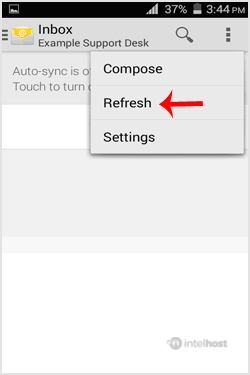
2. In the Mail options, tap on "Menu" and then on the "Refresh" button.
If you do not want to use this method, then tap on the blank area and swipe down to refresh. It will start syncing email.
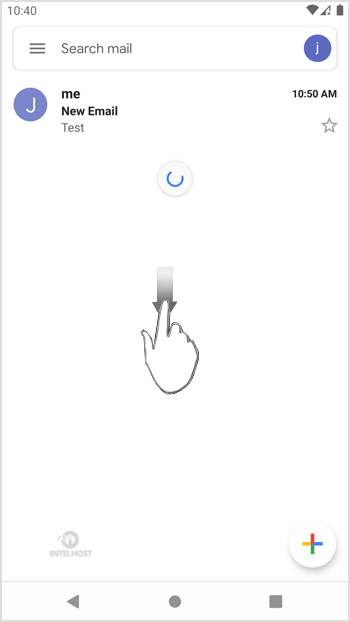
In above screenshot, you can see that after syncing, we have received a new email.
Categories
4
Backup Restore
1 Central del Cliente
28 cPanel Video Tutoriales
11 Databases
9 DNS Nameserver
10 Domain Management
20 Email
9 FTP
13 htaccess cPanel
6 Instalación Panel de Control
8 Mail Filters & SPAM
11 Móvil
25 Panel cPanel
24 Plesk Tutorials
3 Programación
1 Reseller Hosting
10 Seguridad
59 SiteWorx (Control Panel)
79 Softaculous
19 SolusVM
5 SSL
2 VPS Hosting
23 WHM Video Tutoriales
18 Wordpress Hosting
Categories
Tag Cloud
- 0 Users Found This Useful
Related Articles
Cómo agregar una cuenta de E-mail de cPanel a un móvil Android?
You can add a cPanel email account to your Android mobile using the built-in email application....
Cómo leer los E-mails de cPanel en tu móvil Android?
If you have already added your cPanel email accounts to your Android built-in email application,...
Cómo eliminar el E-mail de cPanel en tu móvil Android?
We hope that you have already read our tutorial on How to add cPanel email account in Android...
Cómo enviar un email a través de tu móvil Android?
We hope that you have already read our tutorial on How to add a cPanel email account to your...
Cómo configurar una firma de email personalizada en un móvil Android?
We hope that you have already read our tutorial on How to add a cPanel email account to your...
Powered by WHMCompleteSolution

Loading...
Loading...