
If you want to remove email from Mozilla Thunderbird, you can easily do it but if you use IMAP, the email will only be removed from your Thunderbird email client and the email will be keep on your mail server.
If you use POP settings, then email will be removed from both your Thunderbird Email Client and Main email server.
1. Open Mozilla Thunderbird.

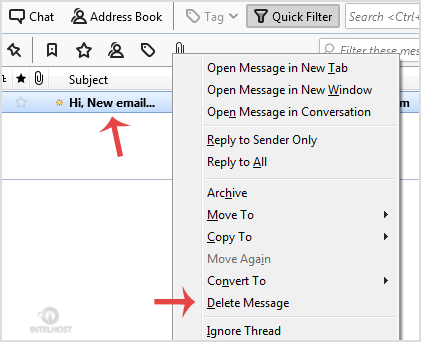
2. Open Inbox and right click on the email you want to delete and then click on the "Delete Message" option.
Categories
4
Backup Restore
1 Central del Cliente
28 cPanel Video Tutoriales
11 Databases
9 DNS Nameserver
10 Domain Management
20 Email
9 FTP
13 htaccess cPanel
6 Instalación Panel de Control
8 Mail Filters & SPAM
11 Móvil
25 Panel cPanel
24 Plesk Tutorials
3 Programación
1 Reseller Hosting
10 Seguridad
59 SiteWorx (Control Panel)
79 Softaculous
19 SolusVM
5 SSL
2 VPS Hosting
23 WHM Video Tutoriales
18 Wordpress Hosting
Categories
Tag Cloud
- 0 Users Found This Useful
Related Articles
Cómo configurar una cuenta de Email de cPanel con Mozilla Thunderbird?
Thunderbird is a nice email client software for managing your email. You can setup a cPanel email...
Cómo comprobar si hay nuevo Email en Mozilla Thunderbird?
Thunderbird is an Email Client Software and you can work with it in the following way. 1. Open...
Cómo enviar un Email utilizando Mozilla Thunderbird?
You can send email using Thunderbird. It is very easy because you do not need to manually login...
Cómo responder al Email en Mozilla Thunderbird?
You can reply to emails using Mozilla Thunderbird instead of using cPanel Webmail. 1. Open...
Cómo reenviar Email en Mozilla Thunderbird?
You can forward email to others email accounts using Mozilla Thunderbird. 1. Open Mozilla...
Powered by WHMCompleteSolution

Loading...
Loading...