
After you received your VPS login details you can find a VPS Login URL, username and password in your welcome email.
SolusVM Login details example:
Control Panel URL: https://cp.example.com or IP Address.
Username: vmuser123 or johndoe
Password: example
How to login to SolusVM Control Panel?
1. Open VPS Control Panel.
2. Enter your SolusVM username in the username field.
3. Enter your SolusVM Password in the password field.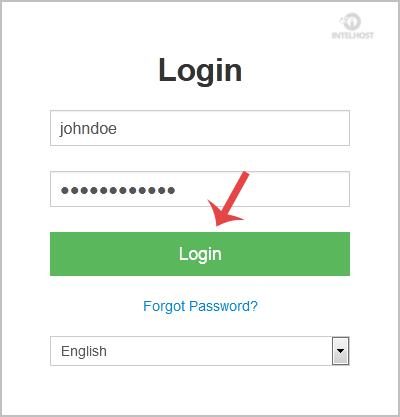
Click on "Login" button and then you will be redirected to your SolusVM VPS management area.
Categories
4
Backup Restore
1 Central del Cliente
28 cPanel Video Tutoriales
11 Databases
9 DNS Nameserver
10 Domain Management
20 Email
9 FTP
13 htaccess cPanel
6 Instalación Panel de Control
8 Mail Filters & SPAM
11 Móvil
25 Panel cPanel
24 Plesk Tutorials
3 Programación
1 Reseller Hosting
10 Seguridad
59 SiteWorx (Control Panel)
79 Softaculous
19 SolusVM
5 SSL
2 VPS Hosting
23 WHM Video Tutoriales
18 Wordpress Hosting
Categories
Tag Cloud
- 1 Users Found This Useful
Related Articles
Cómo verificar si el estado del VPS es "online" o "offline"?
If you want to check your SolusVM VPS status, and determine whether the VPS is offline or online,...
Cómo cambiar la dirección de Email de la cuenta SolusVM?
If you want to update your SolusVM VPS Control panel email address, follow this instruction.1....
Cómo habilitar o deshabilitar la alerta de inicio de sesión de VPS de SolusVM?
Whenever you login to your VPS control panel, you will receive a login email alert and you can...
Cómo cambiar la contraseña del panel de control de SolusVM?
If you can access your SolusVM VPS control panel, you can easily change your SolusVM password. We...
Cómo verificar RAM IP capacidad del disco y detalles de virtualización?
You can check your VPS specification like RAM, disk space, virtualization, IP Address, etc from...
Powered by WHMCompleteSolution

Loading...
Loading...