
A mail exchanger record (MX record) is a type of resource record in the Domain Name System that specifies a mail server responsible for accepting email messages. You can add a "MX Record" using the cPanel"s Zone Editor option.
1. Log into your cPanel account. (eg: www.example.com/cPanel )
2. In the "Domains" section, click on the "Zone Editor" Icon.

Under "Domains", you can see many options below the "Actions" text.
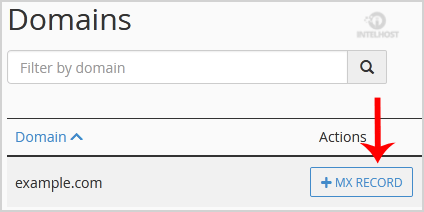
3. Click on the "MX Record" and a small window will open. Enter the required details in it.
Priority: The MX record you use for mail routing should have the lowest preference number, typically 0. You can use 0 for your mail routing record, and 10 for the record validating that you own your domain.
Destination: Enter the domain name of your Mail Exchange. If you use an external mail server, enter the domain name of the external mail server. Alternatively, if you use a local mail server, enter your local domain.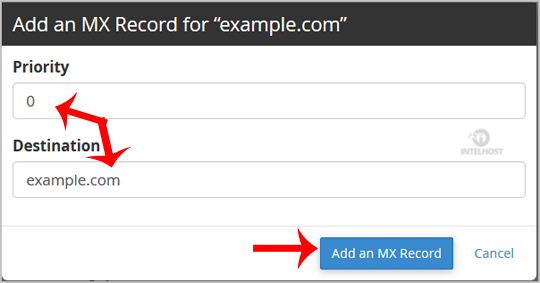
Now click the "Add a MX Record" button.
If the record is added successfully, you will see a success message. The DNS propagation can take up to 24 hours.
Note: It may take anywhere from 12 to 24 hours for the changes to take effect worldwide.
Categories
4
Backup Restore
1 Central del Cliente
28 cPanel Video Tutoriales
11 Databases
9 DNS Nameserver
10 Domain Management
20 Email
9 FTP
13 htaccess cPanel
6 Instalación Panel de Control
8 Mail Filters & SPAM
11 Móvil
25 Panel cPanel
24 Plesk Tutorials
3 Programación
1 Reseller Hosting
10 Seguridad
59 SiteWorx (Control Panel)
79 Softaculous
19 SolusVM
5 SSL
2 VPS Hosting
23 WHM Video Tutoriales
18 Wordpress Hosting
Categories
Tag Cloud
- 0 Users Found This Useful
Related Articles
Cómo restablecer la contraseña de mi cuenta de cPanel?
If you can access your cPanel account, follow these steps to reset your password:1. Log into your...
Cómo cambiar el Estilo/Tema de cPanel?
Switching over to another cPanel theme with a different style is easy and there are two ways to...
Cómo cambiar el idioma de tu cPanel?
cPanel supports a lot of languages, and if you want to change your cPanel language to your native...
Cómo subir archivos a través del cPanel File Manager?
If you don't want to use a 3rd party FTP Software, you can use the cPanel's inbuilt File...
Cómo crear una nueva carpeta o archivos en cPanel File Manager?
1. Log into your cPanel account.2. In the "Files" section, click on the "File Manger" Icon. 3....
Powered by WHMCompleteSolution

Loading...
Loading...