
The SolusVM is a popular VPS hosting control panel and the SolusVM Slave is installed on a dedicated server for creating VPSs on that server.
What are the requirements?
- Fresh CentOS 7, installed on your VPS/Server.
How to install SolusVM Master?
Step 1: Login to SSH as a root account and run these 2 commands:
wget https://files.soluslabs.com/install.sh
sh install.sh
Then it will show you an option to choose virtualization. Most people prefer KVM and others Xen. Select your preferred virtualization by typing 1 or 2 and then press Enter. For KVM, we enter 2 and then hit Enter.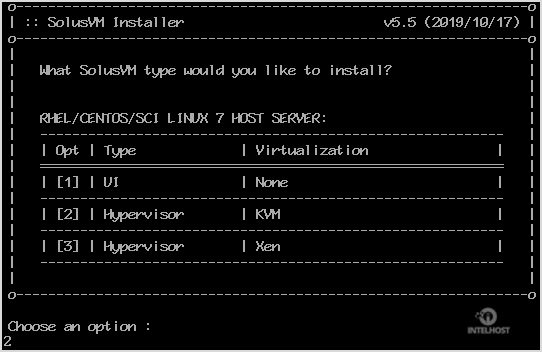
Installation can take from 15 to 20 minutes.
Once it completes, it will show you the Slave keys and further instructions for your virtualization type. Now you can use these keys to add a node in your SolusVM Master panel. You will need a SolusVM Slave license for each node.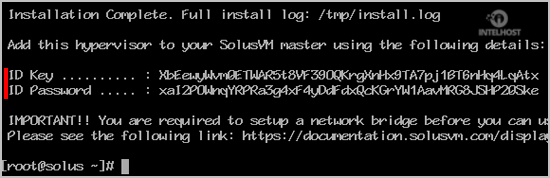
Categories
4
Backup Restore
1 Central del Cliente
28 cPanel Video Tutoriales
11 Databases
9 DNS Nameserver
10 Domain Management
20 Email
9 FTP
13 htaccess cPanel
6 Instalación Panel de Control
8 Mail Filters & SPAM
11 Móvil
25 Panel cPanel
24 Plesk Tutorials
3 Programación
1 Reseller Hosting
10 Seguridad
59 SiteWorx (Control Panel)
79 Softaculous
19 SolusVM
5 SSL
2 VPS Hosting
23 WHM Video Tutoriales
18 Wordpress Hosting
Categories
Tag Cloud
- 0 Users Found This Useful
Related Articles
Cómo instalar cPanel?
cPanel is a #1 Hosting Control Panel in the web hosting industry and you can easily install...
Cómo instalar Plesk o Onyx en Linux CentOS?
Plesk is a popular website control panel and it makes managing your website easy. Although it is...
Cómo instalar DirectAdmin en Linux CentOS?
DirectAdmin(DA) is a Commercial Hosting Control Panel and is used for selling shared and reseller...
Cómo instalar Webmin en CentOS 7 Linux?
Webmin is a free hosting control panel with an easy installation. It takes only 5 to 10 minutes...
Cómo instalar SolusVM Master en CentOS 7 Linux?
SolusVM is a popular VPS hosting control panel and SolusVM master is used for controlling Slave...
Powered by WHMCompleteSolution

Loading...
Loading...